
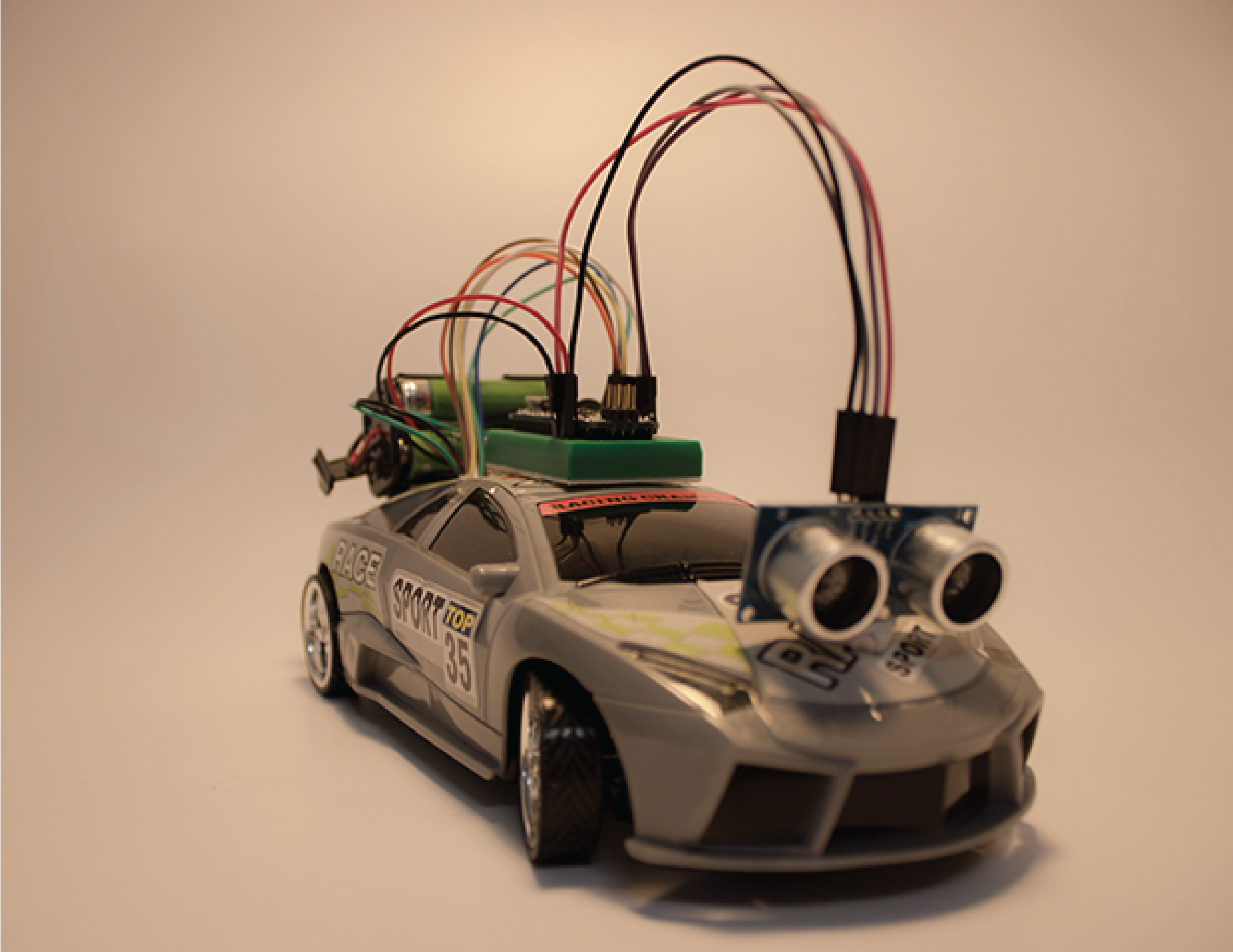
In this year Eletrónica e Informática (http://ei.aicb.pt) i presented a project prototype of an autonomous car controlled by an Arduino Nano.
The project was simple: a r/c car was controlled by an Arduino nano and uses an ultrasound sensor to detect obstacles that was in his front. If it was detected an obstacle, it stops, moves back and changed direction.
Material:
- One r/c car
- One Arduino Nano
- One L298 Dual H-Bridge Motor Drive
- One HC-SR04 ultrasound sensor
- Jumper cables
- Two mini breadboards
- One 9V connector to power the Arduino
- One battery holder to power the L298 ( must hold 4 1.5V batteries)
Step 1:
Disassemble the r/c car and remove the control board. Keep only the chassis and the motors.

Step 2:
Connect the L298 to both motors and run the power cables out. The L298 uses twelve connections. On one side (blue connectors), two supply power the motor A, two supply power to motor B and the remaining two supply power to the module. On the other side (yellow connectors), two connectors activate and deactivate the motors (enableA and enableB) and the other four define the rotation direction of the motors (two for motor A and two for motor B)(A1, A2,B1,B2).

Step 3:
Close the car and connect the L298 to the Arduino.
In my case the Arduino as to be on the top of the car because there wasn’t space inside.
The L298 connects to the Arduino as follow:
| L298 | Arduíno |
|---|---|
| enableA | 12 |
| enableB | 9 |
| A1 | 11 |
| A2 | 10 |
| B1 | 8 |
| B2 | 7 |

Step 4:
Connect the Arduino to the Ultrasound sensor. The sensor uses 4 connectors. Two are power (5V and ground), one is Echo, that receives the reflected signal and the last one is Trigger, that emits the signal to calculate the distance.
| HC-SR04 | Arduíno |
|---|---|
| VCC | 5v |
| Ground | Ground |
| Echo | 3 |
| Trigger | 2 |

Step 5:
Program the Arduino
/**
 Tiago Santos, 2015
 dark_storm@groundzero.com.pt
 Code to control a RC Car
 Thanks to Bruno Santos (feiticeir0@whatgeek.com.pt) for some code
 Free to share
 **/

//Pinouts
//Ultrasound Sensor
#define trigPin 2 // Trigger 2
#define echoPin 3 //echo 3

//Motor A
int enableA = 12; //12
int pinA1 = 11; //11
int pinA2 = 10; //10
int r;

//Motor B
int enableB = 9;
int pinB1 = 8; //8
int pinB2 = 7; //7

//Variables
long duration;
int distance;

void setup()
{
 Serial.begin(9600);
 /* Initialize Ultrasound Pin Modes */
 pinMode(trigPin, OUTPUT); // Trigger PIN
 pinMode(echoPin, INPUT); // Echo PIN

 /* Initialize Motor A Pin Modes */
 pinMode (enableA, OUTPUT);
 pinMode (pinA1, OUTPUT);
 pinMode (pinA2, OUTPUT);

 /* Initialize Motor B Pin Modes */
 pinMode (enableB, OUTPUT);
 pinMode (pinB1, OUTPUT);
 pinMode (pinB2, OUTPUT);
}
Secção Loop():
void loop()
{
 //check the distance
 distance = checkDistance();

 Serial.println(distance);
 delay(200);
 //if distance is less that 30 cm
 if(distance < 30)
 {
   Serial.println("menor");
   //stop car, turn wheels right and go back for 500 ms. Then stop
   stopMotorA();
   //stopMotorB();
   r = random(1);
   if( r == 1)
   {
     turnRight();
   }
   else
   {
     turnLeft();
   }
   delay(100);
   goBack();
   delay(500);
   stopMotorB();
   stopMotorA();
   if( r == 1)
   {
     turnLeft();
   }
   else
   {
     turnRight();
   }
   delay(100);
   stopMotorB();
 }
 else
 {
   Serial.println("maior");
   stopMotorA();
   stopMotorB();
   goForward();
 }

}
Functions:
//function to calcutate the distance to an obstacle
long microsecondsToCentimeters (long microseconds) {
// The speed of sound is 340 m/s or 29 microseconds per centimeter
// The ping travels forth and back, so, the distance is half the distance traveled
 return microseconds / 29 / 2;
}

//function to check the distance of an obstacle
long checkDistance()
{
 /* The following trigPin/echoPin cycle is used to determine the distance of the nearest
 object by bouncing soundwaves off it */
//Trigger a HIGH pulse for 2 or more microseconds
//Give a short LOW pulse before sending a HIGH one
  digitalWrite (trigPin, LOW);
  delayMicroseconds(2);
  digitalWrite(trigPin, HIGH);
  delayMicroseconds(10);
  digitalWrite (trigPin, LOW);
  //Now, lets read the read the bounced wave
  duration = pulseIn(echoPin, HIGH);
  //calculate the distance
  distance = microsecondsToCentimeters(duration);

  return distance;
}

//function to go forward
void goForward()
{
 //Enable Motor A
 digitalWrite (enableA, HIGH);
 //forward
 digitalWrite (pinA1, LOW);
 digitalWrite (pinA2, HIGH);
}

//function to stop Motor A movement
void stopMotorA()
{
 digitalWrite (enableA, LOW);
}

//function to go back
void goBack()
{
 //Enable Motor A
 digitalWrite (enableA, HIGH);
 //back
 digitalWrite (pinA1,HIGH);
 digitalWrite (pinA2,LOW);
}

//function to stop Motor B movement
void stopMotorB()
{
 digitalWrite (enableB, LOW);
}

//function to turn the RC car right
void turnRight()
{
 //Enable Motor B
 digitalWrite (enableB, HIGH);
 //right
 digitalWrite (pinB1, LOW);
 digitalWrite (pinB2, HIGH);
}

//function to turn the RC car left
void turnLeft()
{
 //Enable Motor B
 digitalWrite (enableB, HIGH);
 //left
 digitalWrite (pinB1,HIGH);
 digitalWrite (pinB2,LOW);
}
The functions “goForward”, “stopMotorA”, “goBack”, “stopMotorB”, “turnRight”, “turnLeft” controls the motors. The motor A comtrols the movement and the motor B controls the direction.
The function “checkDistance” calculate the distance to an object. This emits a signal through the Ultrasound Trigger and receives through Ultrasound Echo. Using the time that the signal takes to go to the objects and comes back, can calculate the distance.
In the Loop section, the car is controlled based on the distance to an object. If the car is at less than 30 cm, this stops moves back for 500ms and changes direction. Is used an ‘r’ variable to make the direction change random. Is the value in ‘r’ is ‘1’ turns left. If it is ‘0’ turns right.
Step 6:
Power everything and test.

Because the low amperage of the 9V battery, was necessary to add an extra pack of batterys to power the motors. As the module is powered by 5v and, when the motors are in operation requires constant and stable power , it was necessary to use four 1.5V , for a total of 6V. Although overcome by 1v the value of L298 this presented no problems.
The code is also available on my GitHub accout ( https://github.com/d4rks70rm/ArduinoLegoTrain ).