One aspect of Lego is that you need some space to play. At some point I had used an Ikea Lack with a 48×48 Lego baseplate for my son play. But quickly ran out of space and were constantly falling to the ground. So I decided to create a larger Lago Play Table with the future possibility of having storage.
For some time ago I had three Lack shelves, one white, one yellow and one blue from Ikea. They were stored with no specific purpose. Since I was in need of a shelf for the office, i create a stand and recycle them. For this I used three 4cm by 4cm of pine.
One of the projects, which was scheduled some time ago, was the construction of a personalized presence light. For this project I decided to use a wooden base with an Arduino and a figure printed in 3D.
First the bases were cut. Due to the low height of the wood it was necessary to cut two pieces, prepare them and to glue it.
Two circles were cut into pine wood with approximately 14 cm in diameter, each.
JigSaw
The first was cut with a jigsaw, but due to the fact that this was a time consuming process, I decided to cut the second on the table saw and end up with the belt sander. After that, it was necessary to perfect both in order to be without imperfections.
Belt Sander
The bases were glued with wood glue, clamped and dried for 24 hours.
Clamps
After that time, the sides of both parts were aligned with a router with a flush trim bit. This bit allows you to level out a part using the bearing area as guide.
Flush trim bit
Next, it was necessary to create the cavity to house the electronics and the socket for the figure. To create these cavities was used, again, the router with a straight bit.
Straight bitFigure Stand
Finally, I made the finishing touches. Create a profile all around with a ogee bit and varnish with matt wood varnish.
Ogee bitFinished profile
Code
  /**
 Tiago Santos, 2017
 dark_storm@groundzero.com.pt
 Code to Marvin Night Light
 Free to share
 **/

int led = 11;
int reed = 10;

void setup() {
 // put your setup code here, to run once:
  pinMode(led, OUTPUT);
  pinMode(reed, INPUT);
}

void loop() {
 // put your main code here, to run repeatedly:
 if( digitalRead(reed) == HIGH ){
   digitalWrite(led, HIGH);
 }else{
   digitalWrite(led,LOW);
 }

}
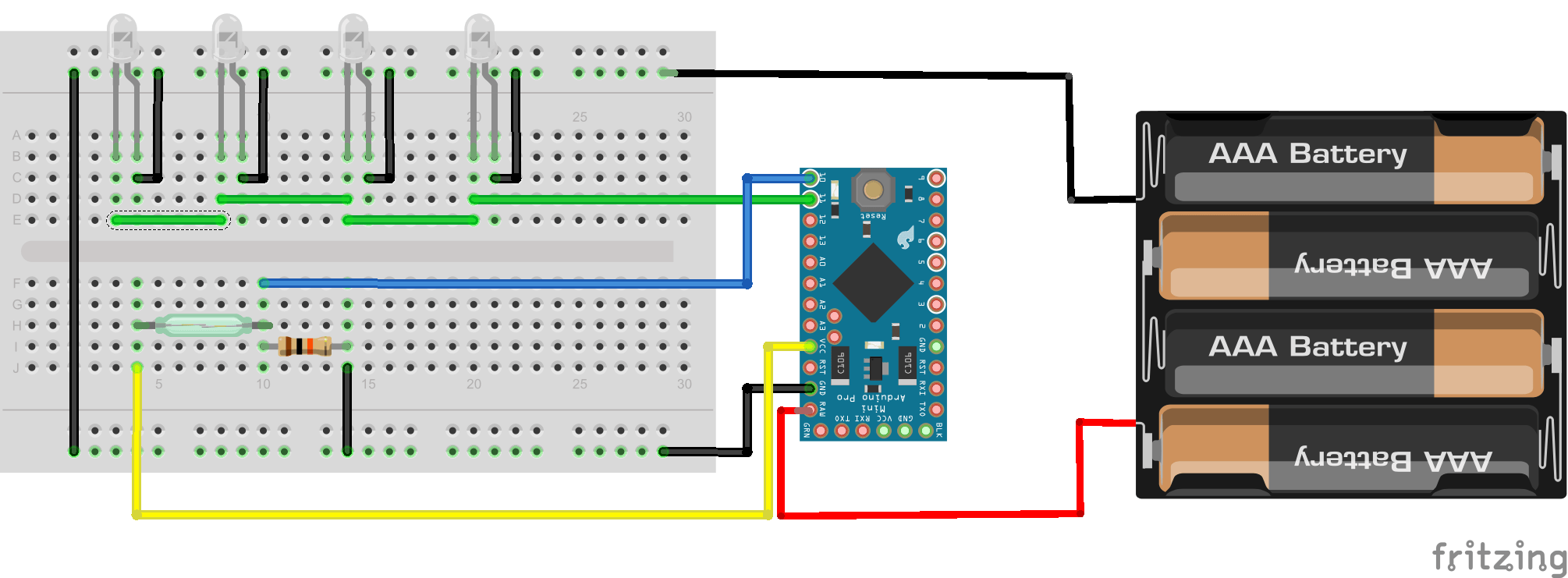
When the magnet approaches the reed, closes the circuit. The Arduino, when detecting that the circuit closes, turns on the LEDs. When the circuit opens, the Arduino switches off the LEDs.
Diagram
After testing the circuit and verifying that it worked correctly, it was only necessary to mount everything in its place.
Electronics
The magnet was placed in the place and transferred to the figure. After this was fixed in the figure with the help of a soldering iron.
Magnet
It was necessary to replace the magnet after this process because, with the heat, it lost the magnetism. The second magnet was fixed in the location with CA Glue.
We use cookies on our website to give you the most relevant experience by remembering your preferences and repeat visits. By clicking “Accept”, you consent to the use of ALL the cookies.
This website uses cookies to improve your experience while you navigate through the website. Out of these, the cookies that are categorized as necessary are stored on your browser as they are essential for the working of basic functionalities of the website. We also use third-party cookies that help us analyze and understand how you use this website. These cookies will be stored in your browser only with your consent. You also have the option to opt-out of these cookies. But opting out of some of these cookies may affect your browsing experience.
Necessary cookies are absolutely essential for the website to function properly. This category only includes cookies that ensures basic functionalities and security features of the website. These cookies do not store any personal information.
Any cookies that may not be particularly necessary for the website to function and is used specifically to collect user personal data via analytics, ads, other embedded contents are termed as non-necessary cookies. It is mandatory to procure user consent prior to running these cookies on your website.